Paper documents reach the books the same day
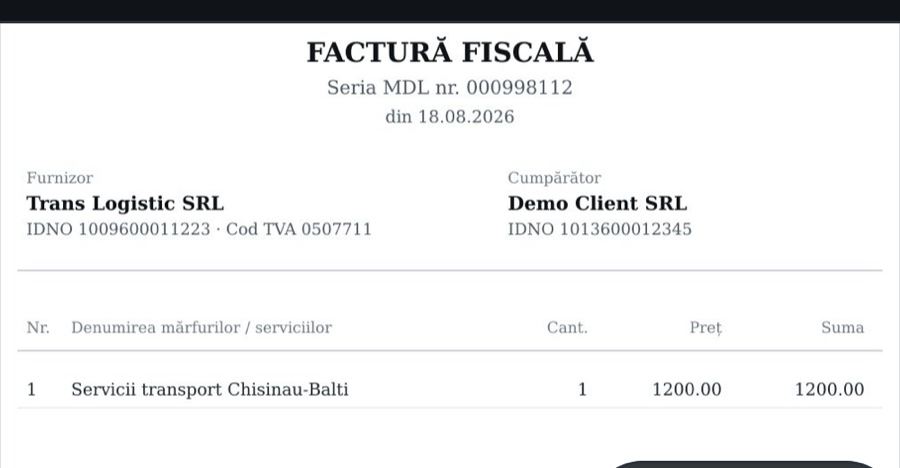
An employee photographs the invoice. The accountant sees verified fields next to the scan. The approved document goes to your accounting system on its own. Code does the arithmetic, not the model.
We will show the workspace on your own stack of invoices. Data is stored in the EU and in Moldova.
- 1C · any configuration
- Syrve / iiko
- AI assistants: ChatGPT, Claude
- Another accounting system · connected fast
- SIA e-Factura · inbound and outbound
Three steps from paper to the books
- 01
Capture
An employee photographs the document in the app or drops a scan into a folder next to the database, and invoices from SIA e-Factura arrive on their own. Page edges, perspective and the offline queue are handled by the system.
- 02
Review
The model extracts fields and lines, code checks the arithmetic, VAT and IDNO. The accountant sees the scan next to the fields and corrects only what did not add up.
- 03
Deliver
The approved document goes to your accounting system, and if there are several, to all of them at once. A retry never creates duplicates, and the delivery status is visible on the card.
e-Factura both ways, with no manual entry
The director creates an API user in the SIA cabinet once, and from then on ContaHub works with e-Factura on its own: it fetches inbound invoices and sends outbound ones. The accountant no longer switches between the SIA cabinet and the books.
Inbound
- Supplier invoices arrive on a schedule and on demand, the fields come from the XML without extraction
- If the same invoice was already uploaded as a photo, the e-invoice is linked to it: no duplicate
- Then the usual path: checks, category, route to the accounting system
Outbound
- The accountant issues the sale in 1C as usual: type “Tax invoice (e-factura)”, number left empty
- The agent picks the document up, ContaHub builds the XML and sends it to SIA, the draft is visible in the workspace
- After signing in SIA, the real series and number return to 1C on their own. The document never leaves twice
- The channel stays off until you switch it on: a fiscal document can only be withdrawn by cancellation
Like self-checkout in a supermarket
The shopper scans the goods, and one cashier watches over ten tills. It works the same here: the document is photographed by whoever holds it, and the accountant only reviews what did not add up.
One accountant, many more documents
The system enters the fields and the lines, the accountant is left with the review. The month-end pile becomes a short daily list.
Fewer errors
Sums, VAT and IDNO are checked by code, not by eye. Typos from manual entry disappear as a class, and a discrepancy arrives with the reason named.
Trained on your data
Posting rules and matches are taken from the documents already in the database and from the accountant’s decisions. The longer it runs, the less a person corrects.
Three parts of one system
The app for whoever holds the document. The workspace for whoever is responsible for it. The agent for the database it has to reach.
Mobile app
iPhone and Android. Sign in by invitation, with a QR code from the workspace or a link from an e-mail.
- System scanner: page edges and perspective, a multi-page document into one PDF with a single button
- A draft is read right on the phone: amount, date, IDNO — you see at once that the shot worked
- Offline queue: the photo waits for a network and leaves on its own; a repeated shot is not uploaded twice
- Quality control: a poor scan asks for a retake, and the new shot replaces the old one
- Chat assistant: “what reached the books”, “where is the Trans Logistic invoice” — answers from the company’s data
- Several companies on one phone, a document card with the status and where it landed
Accountant workspace
A web workspace in three languages: the inbox of every company, review, catalogs, extraction costs.
- Review screen: the scan next to the fields, lens and rotation, line editing, a history of decisions
- Catalog matching by similarity and through AI; corrected once — proposed automatically next time
- Posting rules: account and analytics from the item card, services as a separate document
- Document categories and routes: where a document goes is decided by its type and category
- Items, groups, packagings and counterparties are created in the accounting system straight from the workspace
- Roles and per-company access, search, duplicates, moving a document to the buyer’s company by IDNO
Agent next to the database
A Windows service on the server with the database. Installed with one command, it only makes outbound connections.
- No need to publish the database on the internet: the agent dials ContaHub itself over TLS
- Syncs counterparties and the item catalog every 30 minutes, changes only
- Creates documents in the database with a permanent identifier: a rerun never makes duplicates
- Scan folder: the copier drops a file, the agent picks it up — then the usual extraction
- For 1C, any configuration: the agent explores the database over MCP, and a profile with document and field names is saved in the workspace
- Works without an agent too: the accounting system pulls documents on a schedule through our API
The model reads. The code does the arithmetic.
A model can misread a digit. So the decisions that cost money are not left to it: every document passes deterministic checks, and whatever fails reaches the accountant with the reason named.
- Line sum matches the totalotherwise the document cannot be approved
- VAT by rate: 20, 8 and 0per line and per document
- IDNO checksumfor the supplier and the buyer
- NBM rate for the document datefor invoices in EUR, USD, RON and other currencies
- Supplier in the company registernew or known — visible at once
- Duplicate by business keyone document photographed twice stays one
- Scan qualitybelow the threshold — a retake request, not an error in the books
- Another company’s documentmoves to the right company by the buyer’s IDNO
The books stay where they are
ContaHub does not ask you to move your accounting. It carries the document to your database and makes sure it arrives. The integration model is shared: 1C and Syrve are connected already, another accounting system is connected fast.
Delivery routes
Invoices go to the accounting system, restaurant receipts to Syrve and onward through its standard export. Rules are set by document type and category, and the document header shows where it went and under which number.
Posting rules
The account and analytics come from the item card and the database rules; services are posted with their own document. The accountant does not open the accounting system to fill in the account.
Matching memory
The line “Servicii transport” matched to an item once is proposed automatically next time. Where there is no memory yet, AI suggests.
Catalogs from the workspace
A new item, group, packaging or counterparty is created in the accounting system from the document card. Supplier price lists serve as a ready mapping.
Any 1C configuration
Whatever configuration you run, on connection the agent describes the database structure over MCP, we assemble a profile with document and field names and save it. No code is written for the configuration.
Syrve / iiko
For restaurants: incoming invoices as drafts in Syrve, categories and stores, packagings that turn invoice pieces into warehouse kilograms.
SIA e-Factura
Both ways: inbound invoices arrive on their own, outbound ones go from 1C to SIA, and the signed number returns to the database. If the same invoice was already uploaded as a photo, the e-invoice is linked to it.
Scan folder next to the database
The copier drops a file into a folder next to the database, the agent picks it up into ContaHub, then the usual extraction. Uploaded files move to a subfolder, an error stays next to the file with an explanation.
Rules are written in words, not code
Categories, routes and the confidence threshold are set up by the accountant in the workspace. No developer needed.
- Categories are described in plain language: “Food service: products, drinks, packaging… kitchen equipment does not belong here”. The model chooses only among your categories, and there is a library of ready ones
- A route by document type and category, in order: a food-service invoice goes to Syrve first, then to the books after posting. The set can be changed on a specific document
- Auto-accept threshold: above it the category is set automatically, below it the document asks the accountant
- Benchmark check: documents with a manually set category are re-run through the model after every edit of the descriptions
- A general prompt addition: the company’s rules in your own words, without contacting us
Talk to your own data
Ask your accounting database in plain words in ChatGPT or Claude: balances, a reconciliation act, a payment invoice. The assistant fetches the data from your database through ContaHub, nothing has to be exported or forwarded. Access is granted in the workspace and switched off there.
- A client or an auditor can get view-only access: they can look, they cannot change
- The assistant sees only your companies and databases, every question stays in the log
- The database stays with you: the agent dials out itself, no ports or publishing it on the internet needed
- A new database is connected the same way: the assistant studies its structure, the profile is saved, no changes needed
Sample dialogue. The answer is assembled from database data, not invented by the assistant.
Catalogs moved between databases of different configurations
A client had an old database on one configuration and a new, empty one on another. The standard exchange between them does not work. Through the agent, the assistant studied the structure of both databases, matched groups, units of measure and VAT rates and wrote the catalogs into the new database keeping the identifiers. One request, twenty minutes, no exports or add-ins.
- 2,456catalog items
- 834counterparties with contracts
- 473bank accounts
- 20 mina single request to the assistant
Three people with the same problem
Accounting firms
Every client’s documents in one inbox, per-company access, a history of decisions. The client photographs, the accountant only reviews.
Companies with in-house accounting
The driver, the storekeeper or the manager photographs the document the day it appears. There is no pile at month end.
Restaurants on Syrve
Supplier invoices land in Syrve as drafts with packagings and categories, and from there in the books. One photo, two systems.
Where the documents live and who sees them
- Stored in the EU and in Moldova
The primary site is in Germany (Hetzner), with a real-time copy of the database at a site in Moldova. Transfer over TLS only, passwords to accounting systems are encrypted.
- Role-based access
Owner, accountant, client company owner, employee. Access to a company is closed until it is granted.
- An unalterable log
Every decision — who, what and when — is written to a log that cannot be changed after the fact.
- What the AI sees
The model receives the document image and the company’s catalogs for matching. The company chooses the provider and the model, local ones included.
- Deletion
Poor scans are deleted from the workspace and the app. The account and its data — on request, the procedure is described on a separate page.
Pay for what you use
The price has three parts. The base is processed documents: the monthly invoice shows their number for each company, and the same figure is in the workspace every day. Connections that work without a flow of documents, such as the AI assistant’s access to the database, come as a subscription. The third part is how long documents are kept in the cloud: you choose for how long scans and originals stay available after processing.
For a quote we need three answers: how many primary documents reach you in a month, which systems we connect and how long to keep the documents. Put them in the request and we reply with a price.
- The app, the workspace and the agent are included
- As many users and companies as you need
- Your own or a local AI model makes the document cheaper
What comes next
- Bank
Statements through the bank’s API and reconciliation of operations with documents: a payment either has a document or it does not.
- Aviz and acts
Aviz delivery notes and acts of completed work as separate document types.
- Share from e-mail
A PDF from an e-mail or a messenger straight into ContaHub, without saving to the gallery.
- Tax returns
Tax declarations from the accounting data: the system gathers the figures, the accountant reviews and files.
What people ask before starting
Does the accounting database need internet access?
No. The agent is installed next to the database and only makes outbound connections over TLS. There is no need to publish the database, open ports or set up a VPN. Without an agent, the accounting system can pull documents on a schedule through our API.
Which 1C configurations are supported?
Any, customised ones included. On connection the agent describes your database structure over MCP: we assemble a profile with document and field names, verify it on the live database and save it in the workspace. Neither code nor the configuration needs changing.
We do not use 1C. Can you connect us?
Syrve is connected today, 1C in any configuration. The integration model is shared: routes, deliveries and catalogs do not depend on the system, so a new accounting system is connected fast. Tell us which one you use.
Can we ask about the database in ChatGPT?
Yes. ChatGPT, Claude and other assistants that can connect external tools (the MCP standard) get access to your database through ContaHub: you ask in words, the assistant fetches the data from the accounting database. Access is granted in the workspace; for clients and auditors it is view-only.
Which documents are recognised?
Factură fiscală, bon fiscal and foreign invoices in currency with the NBM rate for the document date. Multi-page documents and PDFs too. Aviz notes and acts of completed work are being prepared.
What if the model misreads a digit?
The document fails the code checks and reaches the accountant with the reason named: the sum does not add up, the IDNO is invalid, no item was found. The accountant corrects the field next to the scan and the system remembers the correction. Responsibility for the data entered into the books stays with the accountant.
What about e-Factura?
It is connected both ways. Inbound: the director creates an API user in the e-Factura cabinet, its login and password go into ContaHub, invoices arrive on a schedule and on demand, the fields come from the XML without extraction. Outbound: a sale in 1C of type “Tax invoice (e-factura)” with an empty number goes to SIA, and after signing the real number returns to 1C. The outbound channel is switched on manually in the workspace.
Where are the documents stored and who sees them?
In the European Union and in Moldova: the primary site is a Hetzner data centre in Germany, with a real-time copy of the database in Moldova. Inside a firm, access is granted by role and by company. The AI model receives the document image and the catalogs for matching; the company chooses the provider and the model.
How do we start?
Send a request. We show the workspace on your documents, create the company and the invitations, install the agent or the add-in. The first documents reach the books on the day you connect.
Can the account and the data be deleted?
Yes, on request. What is deleted, what is kept and for how long is described on the data deletion page in the workspace.
See it on your own documents
We show the workspace on a real stack of invoices and say honestly what does not recognise well. We reply on the next working day.
Or write: info@contahub.md